
Your AI agent shouldn't be able to crash your PC
Codex CLI, Claude Code and AI coding agents can quickly max out your computer’s RAM and CPU, to the point of causing a complete system freeze. Based on my own experience with Linux, here’s how to effectively limit their resource usage with systemd and cgroups v2, including child processes and MCP servers. A native, model-independent solution, without Docker, without additional instructions and without any direct token overhead.
When AI gets a little too confident
This is the first time I’ve talked about AI here. As a career developer, I’ve always had a bit of a hard time accepting AI. But I have to admit that over the past year, the progress made by coding agents has become hard to ignore compared to writing code by hand. Anyway… I use AI, and Codex in particular, directly on my machine (my personal one, I should point out), not inside a Docker container or some other jail.
I use it like everyone else to develop all sorts of tools and applications, and right now I’m building an e-commerce website for a friend’s company.
The website is full JavaScript, with a Node.js server, SSR and the whole shebang. It’s great to scope out tasks for Codex and watch it churn through them at a frantic pace. Things are moving fast. I’ve done more in 3 months than I would have done in a year. The latest feature is infinite scrolling on product listings. Codex, in its immense professionalism, tested what would happen if a user went straight to page 1000, before implementing VirtualScroll.
My PC has a complete meltdown. Everything freezes, I can’t kill a single process. Nothing left to do but reboot to regain control.
The whole thing happened again the following week with another feature. That’s when I started looking for a way to protect my system from this kind of madness.
How we end up here
Codex modifies the code, runs tests and opens the browser with my permissions. To test infinite scrolling, it tried to display 10,000 products at once. Throw in the builds, the MCP servers and the subagents spawning their own processes, and the whole lot can quickly bring your PC to its knees.
What about the sandbox, then?
Agents normally operate within a sandbox, an area where they are somewhat constrained to prevent things from going seriously wrong. The sandbox restricts actions, commands and data reads/writes outside the directory from which the agent was launched.
In practice, agents don’t pay much attention to the sandbox. Between the instructions you give the agent and the sheer number of skills and AGENTS.md files, it always ends up finding some “interpretation” of an instruction that allows it to step outside its sandbox. On top of that, the sandbox doesn’t restrict the agents’ resource usage, and even if agents strictly confined themselves to the sandbox, it wouldn’t solve the freezing problem.
The skill that was supposed to save the day
After the second freeze and reboot of my PC, I started looking for a solution to this resource problem. And being the good AI user that I am, I asked ChatGPT if there was a way to limit the agent’s resource usage. I don’t think I did a particularly good job with my prompt, and when it suggested a skill to tell the agents not to wreck my system, I went, “Great.”
With Codex, I created a skill, resource-guard, which tells it to go through a script whenever it runs tests and subprocesses. The script limits the resources available to the commands it runs.
A quick tweak to the AGENTS.md file to tell it to always use resource-guard when running tests, and there you go.
Codex does go through the script, and Netflix no longer freezes when it runs tests.
After a week, though, I get the feeling I’m burning through more tokens. It’s hard to tell whether the skill has anything to do with it, but just in case, I started digging into what the script actually does. I finally opened the script.
At this point, you’re thinking, “Oh come on, what an idiot, he didn’t even look at what the AI generated for him!” Well, yeah, laziness and overreliance on AI creep in pretty quickly. Then again, I pick my battles, and this time I had no time to waste.
Under the hood, it was already using systemd and cgroups v2.
Systemd and cgroups v2: using Linux’s native mechanisms
Systemd is the system and service manager used by most modern Linux distributions. Beyond booting the system, it allows you to supervise processes and control the resources allocated to them. To do so, it relies in particular on cgroups v2 (Control Groups) , a native Linux kernel mechanism that allows processes to be grouped together and their memory usage, CPU usage and disk I/O to be limited.
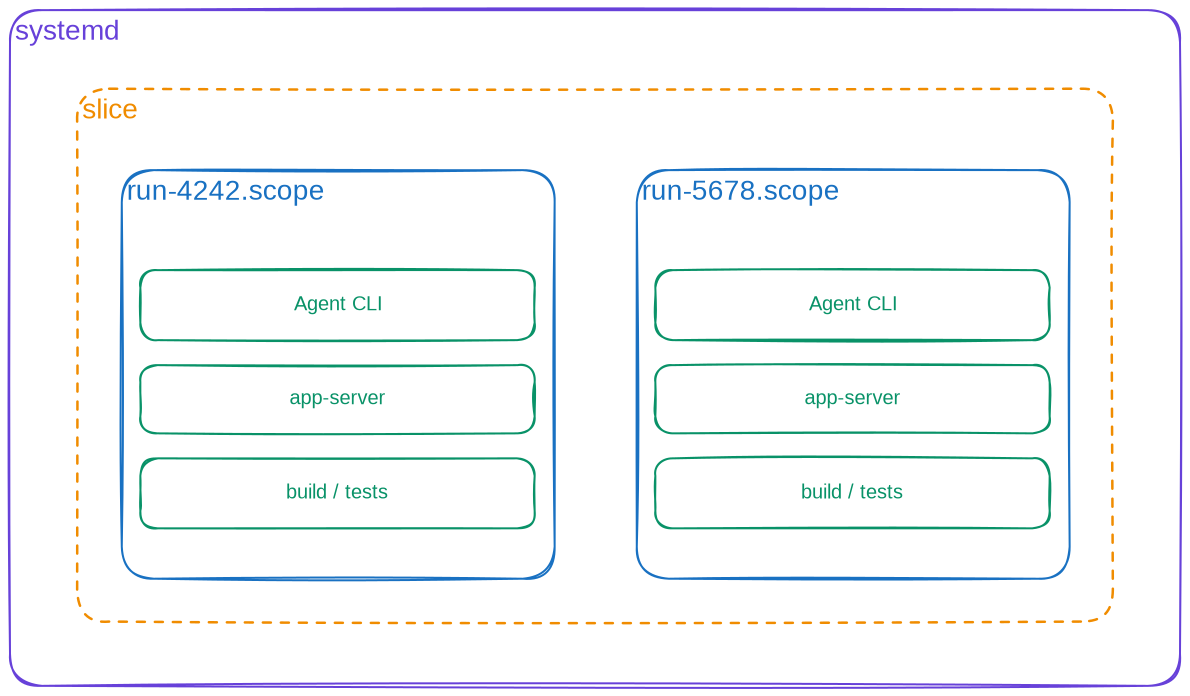
To organise and control these groups of processes, systemd introduces the concept of a slice . A slice allows multiple systemd units to be grouped within the same cgroup and assigned a shared resource budget, with limits that apply to their combined usage.
Now there’s a kernel feature that seems particularly well suited to my problem.
Limiting the agent’s resources with a cgroups v2 slice
We’ll start by creating a slice to put Codex in. In ~/.config/systemd/user/codex.slice:
[Unit]
Description=Codex Resource Guard

[Slice]
CPUAccounting=yes
CPUQuota=200%
CPUWeight=25

MemoryAccounting=yes
MemoryHigh=2G
MemoryMax=3G
MemorySwapMax=256M

TasksAccounting=yes
TasksMax=256

IOAccounting=yes
IOWeight=25
Next, we’ll activate the slice:
systemctl --user daemon-reload
systemctl --user start codex.slice
Then, to check the status of the slice:
systemctl --user status codex.slice
Finally, to launch Codex inside the slice:
systemd-run --user --scope --slice=codex.slice codex
That last command is a bit long, and we don’t really want to have to remember it. So we’ll add a shell alias to keep using codex directly. Through this alias, systems that run the command in the background will also use the slice to launch Codex.
In ~/.bash_aliases or in ~/.config/fish/aliases.fish if you’ve had the good sense to use fish:
alias codex='systemd-run --user --scope --slice=codex.slice codex'
Restarting Codex
You’ll then need to restart Codex. Be careful, simply restarting the client isn’t enough. There’s a server running in the background, and it’s important to stop that too:
codex app-server daemon stop
You can then launch your CLI as usual. It’ll take care of restarting the server and, since you’ve set up an alias, it’ll do so inside the slice. Make sure you actually check this, otherwise your configuration is pretty much useless.
❯ systemd-cgls --user-unit=codex.slice --full --no-pager
Unit codex.slice (/user.slice/user-1000.slice/user@1000.service/codex.slice):
└─run-p1165422-i1165722.scope
  ├─1165468 /home/marthym/.codex/packages/app-server-daemon/releases/0.172.0-x86_64-unknown-linux-musl/bin/codex app-server --listen unix:// --analytics-default-enabled --managed-daemon
  └─1168704 /home/marthym/.codex/packages/app-server-daemon/releases/0.172.0-x86_64-unknown-linux-musl/bin/codex-code-mode-host --listen grpc+stdio://
You should see something like this after launching it.
The limitations of this approach
This approach has the advantage of solving the unexpected freezing problem. Keep in mind, though, that this is not a security measure. The agent isn’t locked inside an isolated environment. It’s purely about controlling how many resources it uses, not what resources it uses.
There are other, more restrictive and secure approaches, such as locking the agent inside a Docker container or even a VM.
This approach also comes with a few constraints. Depending on the restrictions you apply to the slice, the agent’s processes may get killed due to insufficient memory, which can increase token consumption if the agent keeps retrying interrupted tasks over and over again. Something to keep an eye on.
Conclusion
I now let systemd enforce resource limits. On any Linux machine running systemd, I can apply the same principle to Claude Code or Gemini.